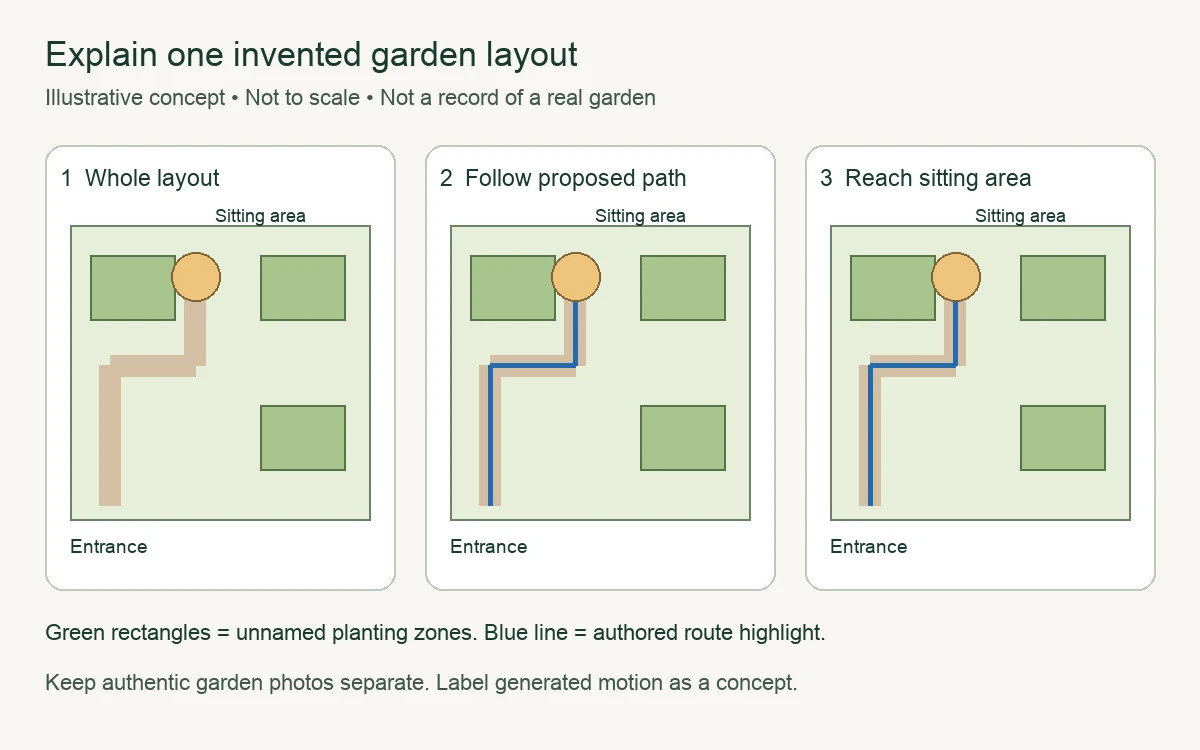
A garden layout is easier to discuss when everyone can see the same idea. A drawing can show a path, a sitting area and the relationship between several planting spaces. Motion can guide attention through that drawing. Neither format, however, proves that a garden has been built or that a particular planting arrangement will succeed.
The useful distinction is between a record and a concept. A photograph of an existing garden records what the camera captured. An invented plot drawing communicates a proposal. A motion interpretation adds another layer of presentation. Keep those categories visible, and your visual explanation can be engaging without becoming misleading.
Start with one layout question
Choose a question small enough for a drawing to answer. “How could the path connect the entrance and the sitting area?” is a clear example. It does not require claims about plant growth, drainage, yield or construction suitability. Those are separate questions that need their own evidence and appropriate advice.
For an exercise, draw an invented rectangular plot with an entrance at one corner, a simple path and a small seating space. Add a few unnamed planting zones. The drawing should represent a communication idea rather than a site-specific recommendation.
Write the purpose next to the image: “Illustrative layout for discussing a route through a garden.” That sentence sets expectations before anyone sees an animation or mistakes a neat picture for a finished design.
Keep the original drawing as your reference
Create the drawing yourself or use artwork you have permission to adapt. Save the original file and give each revision a clear name. If several layouts are under discussion, label them A, B and C instead of letting small differences disappear into a folder of similar images.
A clear reference image does not need elaborate textures. Use simple shapes for the path, sitting area and planting zones. Add a legend for any symbols and include written labels as well as colours. This helps readers understand the layout even if they see it in a small preview or cannot distinguish particular colours.
If the drawing is not to scale, say so. Avoid introducing precise measurements merely to make the concept look authoritative. A conceptual arrangement can be useful without pretending to be a technical plan.
Use photographs for the existing garden
When discussing an actual garden, keep its photographs in a separate reference section. Identify the view each photograph shows, using a simple description such as “View from the entrance.” Do not imply that a photograph covers an area outside its frame.
Work from copies when cropping or adding annotations. Check whether a crop removes a detail that matters to the discussion. For example, an object near the edge of a path may be relevant to the layout question even if it makes the photograph less tidy.
Do not replace an inconvenient detail with a generated version and continue to call the result a photograph of the existing space. An edited concept can have its own purpose, but its caption should identify the change rather than silently turning a proposal into a record.
Make a storyboard before making a clip
A three-panel storyboard is a useful first step. Panel one shows the whole invented plot. Panel two highlights the route from the entrance. Panel three shows where that route reaches the sitting area. Keep the base drawing identical in all three panels.
Add a short caption to each panel. The sequence might read “Start at the entrance,” “Follow the proposed path” and “Reach the sitting area.” These captions explain the concept without claiming that anyone walked that route in a real garden.
The storyboard may be enough on its own. If readers can already follow the idea, motion is an optional presentation choice rather than something the explanation must contain.
An invented layout explains a spatial idea. It does not show a completed garden or demonstrate planting results.
Control exact relationships with authored animation
For a precise explanation, animate the elements you choose. You might move a highlight along the proposed path while the rest of the drawing remains still. You can pause at each point and reveal the corresponding caption.
This approach makes it easier to preserve the original layout. The entrance stays in place, planting zones retain their shape and the path does not develop new branches between frames. Review those relationships before sharing the sequence.
Avoid effects that suggest a result you have not observed. Rapidly growing plants, changing soil or a transformation into a finished garden can imply success or progress. If those effects are part of a fictional concept, label them clearly; otherwise, choose a simpler visual treatment.
Describe generated motion as a concept
An owned illustration can also provide a starting point for a generated motion study. A creator might use an image-to-video workflow to explore a visual interpretation of the invented plot. That interpretation should remain distinct from a recording of an actual garden.
Compare the output with the reference drawing. Has the path changed? Have objects appeared or disappeared? Does the clip suggest planting or movement that was never part of the intended idea? Those changes can affect what a viewer understands, even if the overall scene looks appealing.
Use a caption such as “Generated motion interpretation of an original invented layout; not footage of a real garden.” If the clip obscures the question you wanted to discuss, return to the storyboard or the controlled animation.
Leave the reader with a clear reference
Provide the still drawing alongside any moving version. Include the purpose statement, the labels and the remaining questions in ordinary text. Readers should be able to understand the layout without waiting for a particular frame or watching the clip repeatedly.
Before publishing, check that the title, captions and images describe the same thing. A concept should be presented as a concept. Keeping that boundary clear lets garden visuals support a useful conversation while leaving real conditions and outcomes to authentic records.
Plan an optional fictional narrator
If the invented garden layout benefits from a spoken introduction, Magic Hour lip sync AI matches a presenter’s mouth movements to an audio track. Use original or permitted presenter footage and narration. Label synthetic scenes, check timing throughout the clip, and provide captions. Keep the original reference visible: the presenter explains the idea rather than authenticating it.
For a separate creative experiment, describe an imagined garden-story scene in a written prompt and explore it with Magic Hour AI video generator. Keep the result labelled as generated imagery, compare it with the storyboard and retain a still alternative; the generated scene is not evidence of a real event or a tested outcome.
An owned still can also serve as the starting point for Magic Hour image to video AI. Review any invented movement against the intended scene, retain the original image and label the moving version as a generated interpretation.
About the contributor: Magic Hour creates tools for making and editing visual content. This original article was prepared with AI assistance and submitted for the publisher’s editorial review.